How to Use Alipay in China: A Practical Guide for International Visitors
Set up Alipay with an overseas phone number and international card, understand the two QR payment flows, and prepare a reliable backup before arriving in China.

Direct answer. International visitors can generally register Alipay with an overseas mobile number, complete identity verification with a passport, and link an eligible international bank card. In a shop, either show your payment code for the cashier to scan or scan the merchant's QR code yourself. Set everything up before departure and carry a second payment method in case your card issuer, the app, or a particular merchant declines a transaction.
Key takeaways
- Download the official Alipay app and register with a mobile number that can receive verification messages abroad.
- Add an eligible international credit or debit card and complete any passport or card-issuer checks shown in the app.
- Learn both payment flows: the merchant scans your code, or you scan the merchant's code.
- Treat an overseas card as a funding source for merchant purchases, not as a guarantee that every wallet, transfer, or person-to-person feature will work.
- Keep Weixin Pay, a physical card, and some RMB cash as backups.
Checked: 14 August 2026. App menus, eligible cards, fees, limits and verification requirements can change. Follow the current prompts in Alipay and confirm unusual charges with your card issuer.
What do you need before setting up Alipay?
Prepare the account before you travel rather than at the airport or at the first restaurant. You will normally need:
| Item | Why it matters |
|---|---|
| An overseas mobile number | Registration and security codes may be sent by SMS. |
| A valid passport | The app may request identity verification, especially as usage increases. |
| An eligible international card | The issuing bank must approve the card link and later transactions. |
| Access to your bank's verification method | Your issuer may require an SMS code, banking-app approval or another authentication step. |
| Reliable mobile data | QR payments and security checks depend on a working connection. |
| A backup payment method | An app or issuer approval can fail even when setup was successful. |
The Chinese government's current guidance says overseas visitors can register major payment apps with foreign or Chinese mobile numbers and link cards from several international networks. It also warns that eligible card brands, fees and payment limits vary by product. That is the right mental model: Alipay is widely useful, but the app and your issuer make the final decision for each card and transaction.
How to set up Alipay with an international card
1. Download the official app
Install Alipay from your device's official app store. Do this on a trusted network before departure. Check the publisher, avoid third-party download sites, and update the app before you leave.
2. Register with your overseas phone number
Select the correct country or region code, enter the number, and complete the security check. Keep that number active during the trip. If you use a travel eSIM for data, remember that your original SIM may still be needed to receive a bank or Alipay verification message.
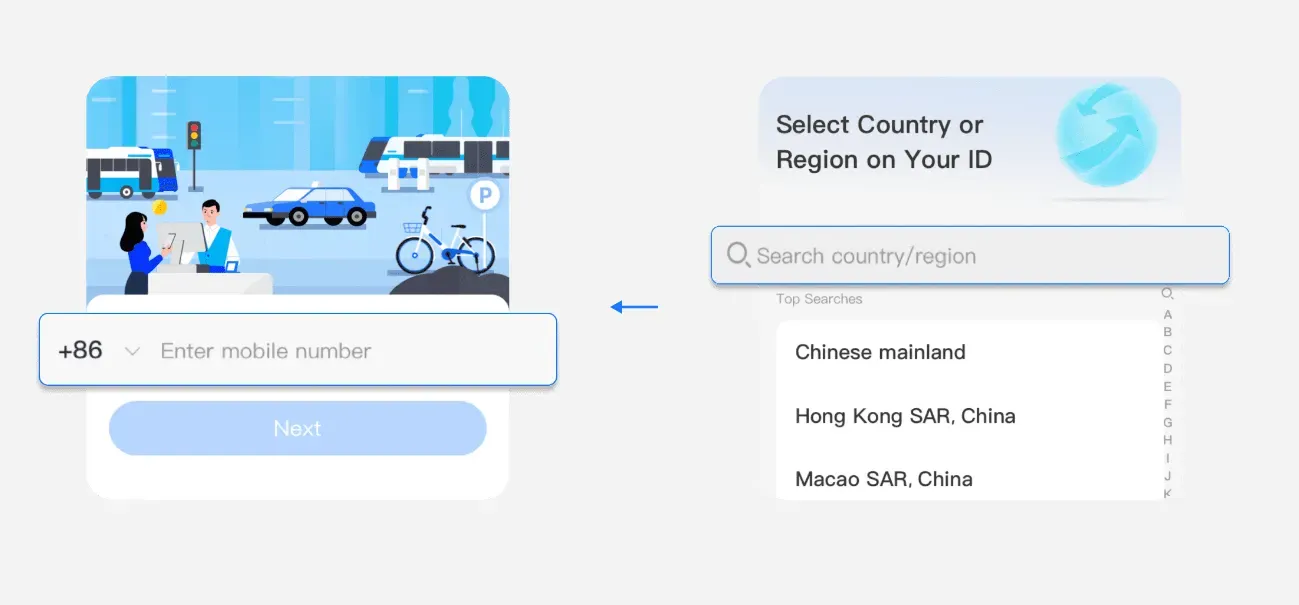
Alipay registration screens shown for orientation. Source: Trip.com Alipay guide. App screens can change.
3. Choose a language and review the home screen
Alipay offers multiple interface languages. Menu names can change by app version, so use the search function if an older guide refers to a button you cannot see. The important functions are usually labelled Pay, Scan, Bank Cards, and Transport.
4. Add your international card
Open the account or profile area, find Bank Cards, and choose Add Card. Enter the card details exactly as held by your bank. Your issuer may ask you to approve the link through its own verification flow.
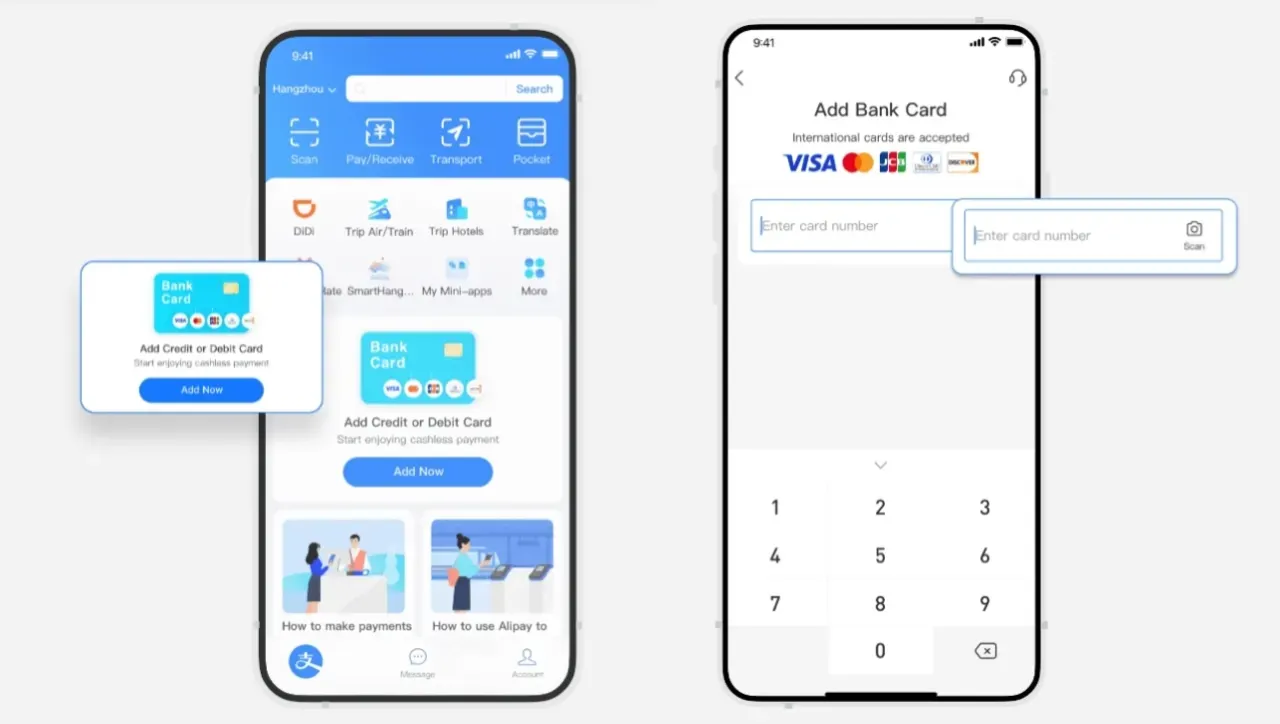
The international-card setup flow in Alipay. Source: Trip.com Alipay guide.
If the card is rejected, do not keep repeating the same attempt. Confirm that international and online transactions are enabled, check whether the bank blocked a foreign digital-wallet request, and try a different eligible card if available.
5. Complete identity verification when prompted
Alipay may request passport details, a passport image, a facial check, or additional information. Use accurate details that match the cardholder and travel document. Verification can unlock broader use and reduce the chance of a payment being interrupted later.
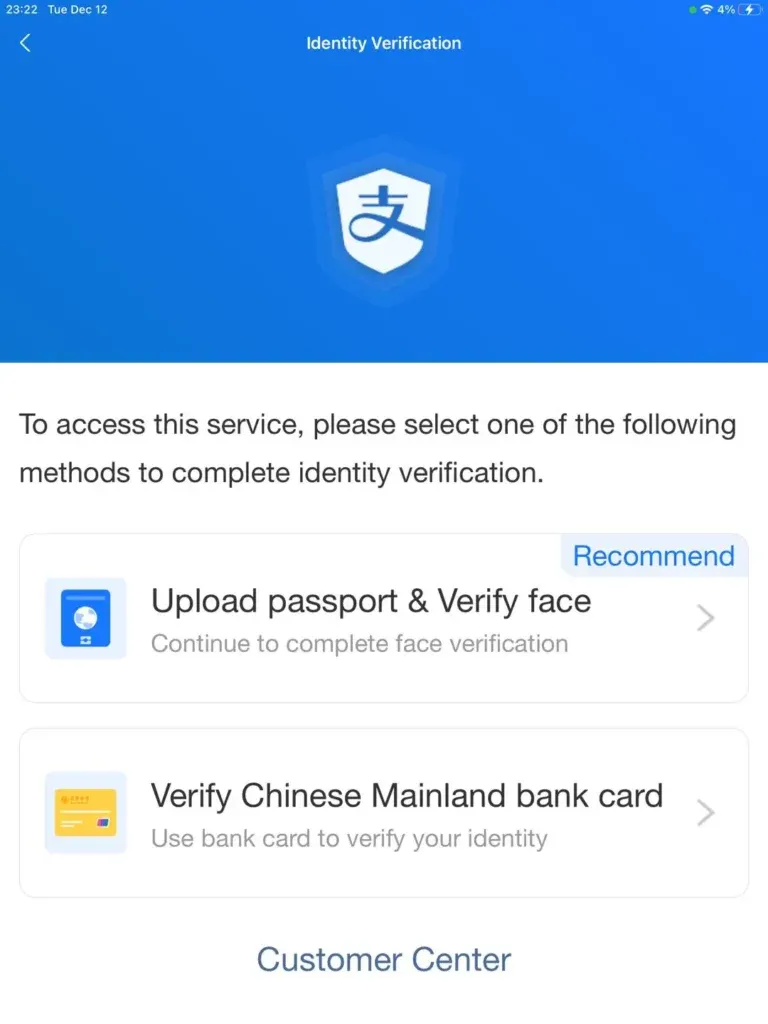
An Alipay identity-verification prompt. Source: Trip.com Alipay guide.
6. Secure the account
Enable a payment password and device biometrics where available. Turn on transaction alerts from both Alipay and your bank. Avoid saving screenshots of live payment codes; they are intended to be generated inside the app.
How do you pay with Alipay in a shop?
There are two common QR-code flows. The distinction is simple and worth practising before the trip.
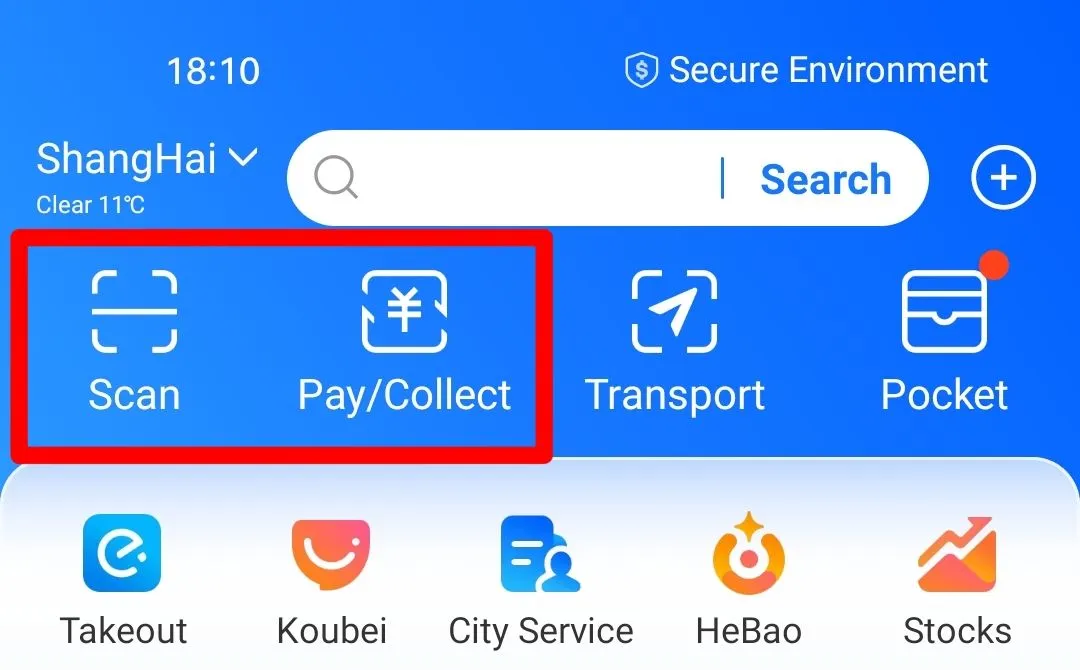
Use Pay/Collect when the merchant scans you, or Scan when you scan the merchant. Source: Trip.com Alipay guide.
The merchant scans your payment code
Open Pay and present the code to the cashier. The merchant scans it, the amount appears, and you confirm if required. This is common at supermarkets, convenience stores and staffed counters.
Before approving, check the amount and currency. Do not hand an unlocked phone to a stranger. Hold the screen so the cashier can scan it while you retain control of the device.
You scan the merchant's QR code
Open Scan, point the camera at the merchant's code, enter the amount if it is not pre-filled, and verify the merchant name before confirming. This flow is common at smaller businesses, restaurants and table-side payment points.
If the code appears to be a personal collection code rather than a normal merchant checkout, an international card may not work. Ask the business for another payment method instead of repeatedly retrying.
Where can an international visitor use Alipay?
Alipay is useful for everyday merchant payments across mainland China, including many shops, restaurants, hotels, attractions and mobility services. It can also serve as an entry point to mini-apps for taxis, tickets and local services.
Availability is not identical to feature access. A linked overseas card may work for a restaurant purchase but not for a personal transfer, wallet balance top-up, red packet, or another function designed around a mainland bank account. For visitors, the dependable use case is paying an eligible merchant for goods or services.
For an executive delegation, test the following before the first full programme day:
- one small staffed-counter purchase;
- one merchant QR-code payment;
- the chosen ride-hailing flow;
- the transport option for the relevant city, if the group will use public transit;
- the backup card and cash plan held by the programme lead.
How do you use Alipay for transport?
Search for Transport in Alipay and select the city. Depending on the city and service, you may be able to activate a metro or bus code, book a ride, or open a mobility mini-app. Identity verification or a separate service agreement may be required.
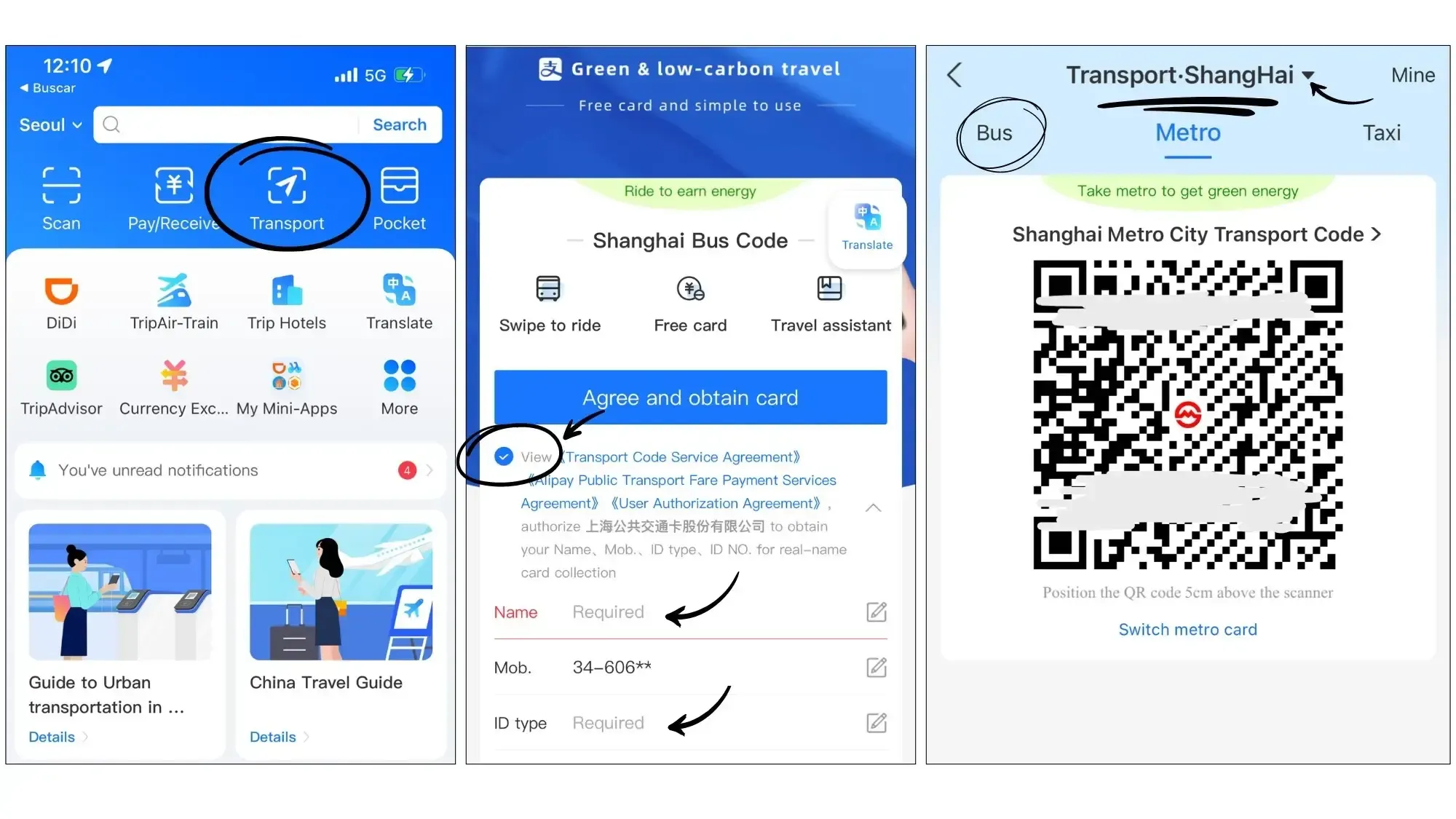
Example Alipay transport-code activation for Shanghai. Source: Trip.com Alipay guide.
Do not assume one city's transit code works in another. Recheck the selected city after travelling between Shanghai, Hangzhou and Shenzhen. At metro gates, scan the transport code rather than the normal merchant payment code.
Why does an Alipay payment fail?
| Symptom | Likely cause | What to do |
|---|---|---|
| Card will not link | Issuer rejection, unsupported card, data mismatch or security block | Confirm the card details, approve the bank check, contact the issuer, or try a second eligible card. |
| Card linked but payment declined | Issuer fraud control, transaction limit, merchant category or network issue | Check bank alerts, try a smaller legitimate purchase, use another card or switch payment method. |
| Merchant QR will not accept the card | The code or transaction may not support an overseas-card-funded payment | Ask for a merchant payment code, Weixin Pay, a physical card terminal or cash. |
| Verification message never arrives | Roaming, spam filtering, inactive home SIM or incorrect country code | Restore the original SIM, check roaming and messaging, then request one new code. |
| Transport code does not work | Wrong city, incomplete activation or a service-specific restriction | Re-select the city, finish the transport setup, or buy a ticket with another method. |
| App works on Wi-Fi but not outside | Data plan, roaming or network permission problem | Enable mobile data for Alipay and keep an offline destination/address note while troubleshooting. |
What should business travellers do about fees and exchange rates?
Separate three possible costs: a platform service fee, your card issuer's foreign-transaction fee, and the card network's currency conversion. The amount and threshold can change, so do not rely on a screenshot from an old travel guide. Review the amount shown before confirmation and check the card statement afterward.
Where a currency choice is offered, understand who performs the conversion before accepting it. A card with no foreign-transaction fee can reduce costs, but it does not prevent an issuer from blocking an unfamiliar transaction. Tell the issuer about the trip if that is part of its security process.
For corporate cards, confirm the employer's mobile-wallet policy. Some companies require the traveller to use a named card, retain a tax invoice, or separate personal mini-app purchases from reimbursable business expenses.
A safer setup for executive groups
The strongest approach is not to make every delegate solve the same problem independently after landing. Add a payment-readiness check to the programme preparation process:
- Ask every traveller to install and register before departure.
- Confirm that at least two group members have successfully linked different eligible cards.
- Test a low-value payment before the first time-critical transfer or dinner.
- Nominate a programme lead who holds RMB cash and an alternative physical card.
- Keep hotel names, meeting addresses and emergency contacts outside any single super-app.
- Record receipts immediately; mini-app order histories can be harder to reconcile after the trip.
This redundancy matters on a private China AI executive immersion. A failed payment should not delay a site visit, train departure or confidential business meeting.
Alipay or Weixin Pay: which should you set up first?
Alipay is often the clearest first wallet for a short-term international visitor because payment and travel tools are prominent in the interface. Weixin Pay is valuable as a second wallet, especially when the traveller already uses WeChat for local communication and business contacts.
The practical answer is to prepare both if possible. Read our Weixin Pay setup guide for international visitors, then use the broader China payment guide to build a cards-and-cash fallback.
Frequently asked questions
Can I use Alipay without a Chinese bank account?
International visitors can generally link an eligible overseas card for merchant payments without opening a mainland bank account. Not every Alipay feature is available through an overseas card.
Do I need a Chinese phone number?
An overseas mobile number can generally be used for registration. Keep access to that number because Alipay or your card issuer may send security messages during the trip.
Can I send money to a friend with a foreign card?
Do not plan around it. International-card support is primarily designed for eligible purchases from merchants. Personal transfers and wallet-balance functions may require different eligibility.
Should I carry cash if Alipay is set up?
Yes. Carry a modest amount of RMB and a physical card. Cash is a useful fallback when a phone battery, mobile network, issuer or merchant payment flow fails.
Should I top up an Alipay balance?
Most short-term visitors should first try paying merchants directly with the linked card. Balance and prepaid products can have separate rules, fees and eligibility requirements.
Sources and further reading
- Trip.com: How to Use Alipay in China
- The State Council of China: Guide to Working and Living in China
- The State Council of China: Payment Service Guide for Overseas Visitors
This guide is general travel preparation, not financial advice. Product availability is determined by Alipay, the merchant and the card issuer at the time of use.